2D Search
Sketch the part you are looking for or have a photo described in text form
Create image description with AI
Drop file hereor
Supported file formats: .PNG, .JPG, .JPEG, .WEBP

How can I install 3Dfindit as an app?

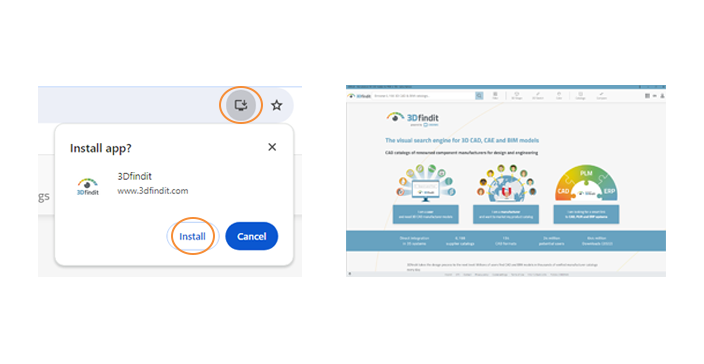
To install (see video), simply click on the screen icon with the downward-pointing arrow on the right in the address bar. The app then opens automatically and from then on you can find components directly via the desktop icon or the icon in the taskbar. Users of the app with mobile devices open 3Dfindit via the icon on their home screen.

Desktop

Supported internet browsers are: Google Chrome, Microsoft Edge and Safari.
Google Chrome

  1. Click on the screen icon in the URL address bar at the top and select "Install".
  2. A notification will then appear on Windows that the app has been installed.
  3. You can now open it directly via the start bar.

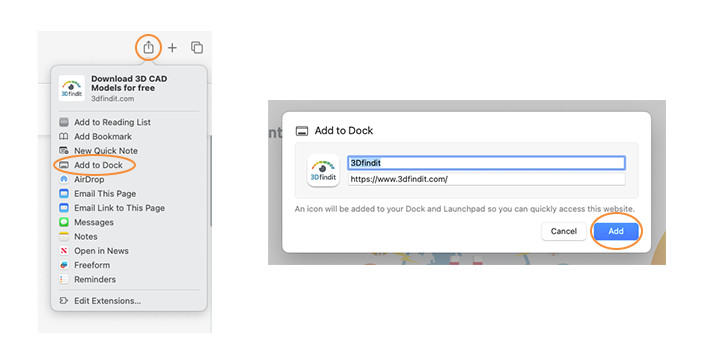
Safari

  1. Click on the screen icon in the URL address bar at the top and select "Install".
  2. Windows will then display a notification that the app has been installed.
  3. You can now open it directly via the start bar.

Mobile

On mobile devices with iOS and Android operating systems, the installation is as follows: